The persistent challenge of achieving bit-perfect, high-resolution audio playback from Apple Music on home hi-fi systems has remained an unresolved issue for consumers four years after the introduction of lossless and hi-res lossless tiers. The process often necessitates meticulous hardware selection and manual configuration, proving to be a complex undertaking for an increasing number of listeners seeking uncompromised audio fidelity. Lysoniq, a US$12 iOS application, has emerged as the most pragmatic solution to this quandary, offering a workaround that bypasses Apple’s inherent limitations. Its recent update, introducing support for the Apple TV, further expands its utility and accessibility for audiophiles.

Understanding the Problem: A Technical Deep Dive
At its core, the issue stems from how Apple Music streams are handled across various Apple devices and ecosystems. The primary goal for audiophiles is "bit-perfect playback," meaning the digital audio data reaches the Digital-to-Analog Converter (DAC) exactly as it was transmitted from Apple’s servers, without any alteration, resampling, or lossy compression.

AirPlay 2, a widely adopted wireless audio streaming protocol within the Apple ecosystem, significantly compromises bit-perfect playback. When audio is routed through an iPhone or iPad via AirPlay 2 to a receiver or speaker, it is typically re-encoded into a 256kbps AAC format. This re-encoding process, regardless of the source material’s quality or the user’s settings in Apple Music, introduces compression and reduces the audio fidelity, making it far from bit-perfect. In many cases, even some Bluetooth codecs offer superior audio quality.
macOS, while offering more direct control, presents its own set of challenges. The operating system’s Core Audio framework mandates a fixed sample rate, which must be manually configured in the Audio MIDI Setup utility. If this rate is set to 44.1kHz, higher resolution tracks (e.g., 192kHz) will be downsampled, and conversely, setting it to 192kHz will lead to upsampling of lower resolution tracks. This constant resampling means that bit-perfect playback is not achievable without manual adjustments for every listening session. Furthermore, a Mac running Apple Music cannot be remotely controlled from a comfortable listening distance, such as a couch.

The Apple TV, a popular device for media consumption, imposes even stricter limitations on audio quality. Its HDMI output is inherently capped at 48kHz. This means that any high-resolution audio content, regardless of its original sample rate, will be downsampled to 48kHz before it even leaves the device. Moreover, the Apple TV’s tvOS, an Android-based operating system, will further resample all 44.1kHz signals to 48kHz before they are sent to an amplifier. The end result is a consistent 48kHz output, effectively disqualifying the Apple TV from delivering bit-perfect high-resolution audio.
Potential Workarounds and Their Limitations

Recognizing these shortcomings, several solutions have emerged, each with its own set of compromises:
Eversolo Devices: Modified Android devices from brands like Eversolo have attempted to circumvent the 48kHz resampling limitation by altering Android’s audio subsystem. Early iterations of these devices allowed for bit-perfect playback of Apple Music via screencasting, with remote control capabilities. However, newer integrated solutions from Eversolo have reportedly limited audio quality to CD-level or possibly lossy compression, with prices starting at approximately $859.

FiiO R7 and R9: FiiO’s R7 (priced around $699, now discontinued) and R9 (priced around $1499) offer a similar Android-based workaround to Eversolo. These devices allow for direct installation of the Apple Music app from the Google Play Store, bypassing some of the OS-level resampling. However, FiiO’s screen-casting application has been noted for its less responsive performance, often requiring users to physically interact with the device’s touchscreen for operation.
iPadOS and iOS with USB DACs: Connecting a USB DAC directly to an iPad or iPhone offers a pathway to bit-perfect audio. In this configuration, Apple Music streams are delivered to the DAC without any interference from the operating system. A 44.1kHz track will remain 44.1kHz, and a 192kHz track will be transmitted as such. This method ensures bit-perfect integrity. However, the significant compromise here is the absence of remote control functionality, forcing users to remain near their device to manage playback. It is important to note that Android tablets do not offer this benefit, as their operating systems also apply the 48kHz resampling.

The Lysoniq Solution: Bridging the Gap
Lysoniq aims to address the most significant remaining challenge: remote control without sacrificing audio quality. The app’s functionality is built on a clever separation of control and playback.

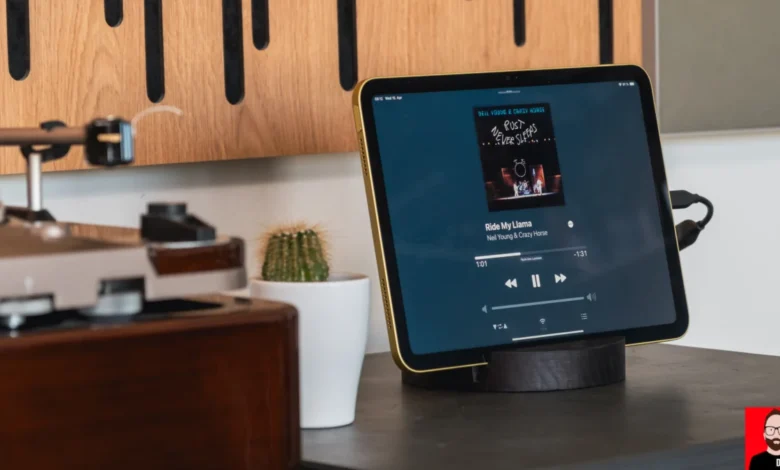
Initial Setup with iPad and DAC: The core of Lysoniq’s operation involves installing the app on an iPad that is physically connected via USB to a DAC. Upon launch, Lysoniq synchronizes with the user’s Apple Music library, presenting an interface that closely mimics the native Apple Music app’s layout. This familiar design ensures ease of navigation for existing Apple Music users. Crucially, while the interface may appear native, all operations are actually being handled within Lysoniq.
Networked Control: The next step involves installing Lysoniq on an iPhone. These two instances of the app, running on the iPad and iPhone, can then discover each other across a local network. The "LYNQ" button, located at the bottom center of both the iPhone and iPad applications, is used to designate the playback device. In this configuration, the iPhone acts as a full-fledged remote control. Users can browse their music library, manage playback queues, and adjust volume, all from their iPhone. The iPad, connected to the DAC, handles the actual audio streaming and transmission, drawing Apple Music files directly from Apple’s servers at their native resolution. The iPhone, in this scenario, only transmits control signals, never touching the audio data itself. This architecture effectively separates the playback engine from the user interface, a design principle that mirrors professional streaming systems.

Automatic Sample Rate Switching: A key advantage of Lysoniq is its seamless automatic sample rate switching. Unlike macOS, which requires manual intervention in Audio MIDI Setup or the use of third-party applications like LosslessSwitcher, Lysoniq intelligently adjusts the iPadOS sample rate to match each incoming track in real-time. For example, a track like Neil Young’s "Rust Never Sleeps," which is available at 24-bit/192kHz on Apple Music, will be delivered to the DAC at precisely that resolution, without any unwanted upsampling or downsampling. This transparency ensures that the audio integrity is preserved, providing an unadulterated listening experience.
The Apple TV Integration: A New Dimension of Control

The most recent and perhaps most innovative development is Lysoniq’s integration with the Apple TV. This addition might seem counterintuitive at first glance, given the Apple TV’s inherent 48kHz audio output limitation. However, the Apple TV app is not designed for playback; instead, it serves as an enhanced controller.
Workflow with Apple TV: When the Apple TV app is launched, the "LYNQ" button in the top right corner allows users to nominate their iPad as the playback device. With Lysoniq already running on the iPad and connected via USB to a DAC, the Apple TV app provides a new way to control this setup. Users can now utilize the Apple TV’s remote to control playback from their couch, with the audio stream bypassing the Apple TV entirely. The audio path remains consistent: from Apple’s servers to the iPad, and then to the DAC, preserving full native resolution. The Apple TV, in this context, only handles the control signals, mirroring the role of the iPhone in the previous configuration.

Benefits of the Apple TV Controller: This new workflow offers a compelling alternative for users who prefer the tactile experience of a physical remote wand over a smartphone interface for controlling their home audio system. The Apple TV’s larger screen displays the Apple Music library with enhanced clarity, which can be particularly beneficial for those who find smartphone screens less convenient for browsing extensive music collections. Crucially, since the audio chain remains identical to the iPad-only setup, the hi-res audio integrity is fully maintained.
Enhanced Flexibility: Lysoniq provides remarkable flexibility in how users can manage their listening experience. Both the iPad and the Apple TV can display "now playing" information simultaneously. Users can switch between controlling playback from either device at any time, or even hand control back to their iPhone. Furthermore, the iPad screen can be turned off to conserve battery power while music continues to play, showcasing the app’s robust background operation.

Performance Improvements and Minor Niggles: Previous playback issues noted in earlier versions of Lysoniq, such as occasional playback gaps and an audio-leak-on-pause bug, appear to have been resolved in recent updates. However, a minor inconvenience persists: the "Recently Played" library section requires a full app restart to refresh its contents. Additionally, the author suggests that changing the default button on album pages from "Artist Browse" to "Play" would enhance user experience.
Target Audience and Value Proposition

Lysoniq primarily targets Apple Music subscribers who already possess an iPad and a USB DAC. The application effectively repurposes potentially underutilized hardware, providing the remote control functionality that Apple itself has failed to deliver for its own music service. By leveraging existing devices, Lysoniq offers a cost-effective solution for achieving bit-perfect high-resolution audio playback, a feat that Apple’s native AirPlay 2 implementation actively hinders.
The addition of the Apple TV app significantly broadens Lysoniq’s appeal by introducing a refined and user-friendly control surface for home listening without compromising the core functionality of preserving Apple Music’s hi-res audio integrity. For a nominal cost of US$12, the investment in Lysoniq is comparable to purchasing a new CD, making it an accessible option for audiophiles seeking to unlock the full potential of their Apple Music subscriptions and hi-fi systems. The ability to stream high-resolution audio from Apple Music to a DAC, with convenient remote control from a comfortable listening position, represents a significant step forward for discerning listeners within the Apple ecosystem.