Gliff: A Free Plugin Revolutionizing Guitar and Keyboard Integration for MIDI Production

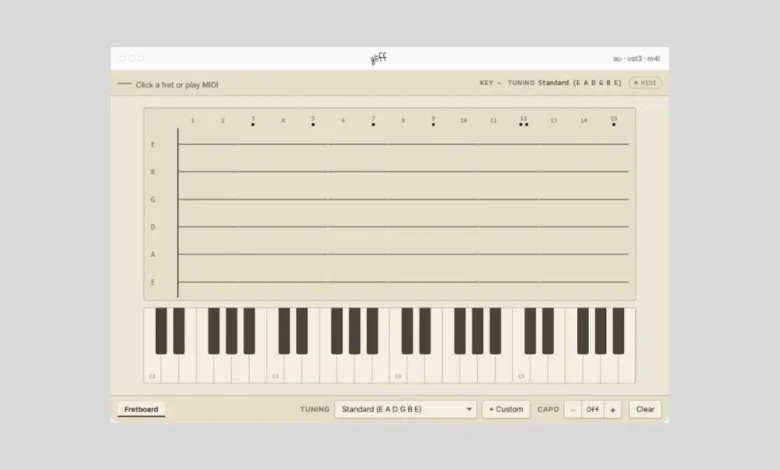
Gliff, a newly released free plugin for macOS and Windows, is poised to reshape how guitarists and keyboardists approach MIDI production. Developed with an innovative dual-purpose design, Gliff offers a unique bridge between traditional instrumental performance and the digital realm of MIDI sequencing, catering to both seasoned guitar virtuosos and keyboard maestros. While its name might evoke images of direct guitar-to-MIDI conversion, a closer examination reveals a more nuanced and versatile functionality that addresses common creative bottlenecks in music production.
Understanding Gliff’s Core Functionality
At its heart, Gliff is designed to process incoming MIDI data and translate it into tangible guitar fretboard visualizations and clean, polyphonic MIDI output. This core mechanism opens up two primary avenues for users, each offering distinct advantages depending on their existing skill set and creative objectives.
The first approach targets guitarists who may not possess a MIDI guitar but wish to leverage their instrumental proficiency for MIDI sequencing. In this scenario, Gliff acts as a sophisticated chord generator. A guitarist can use their conventional instrument, feeding MIDI data into the plugin (likely through a MIDI interface or a MIDI guitar if available), and Gliff will then interpret this input to generate polyphonic MIDI chord patterns. These patterns can be directly dragged and dropped into a Digital Audio Workstation (DAW), providing a seamless way to build harmonic progressions for keyboard or synth tracks using the comfort and familiarity of their primary instrument. This bypasses the need for extensive keyboard skills for chord construction, allowing guitarists to focus on their strengths while contributing to diverse sonic textures.
However, it is crucial to clarify a potential point of confusion: Gliff does not analyze audio signals from a guitar. Phrases like "turns guitar into MIDI" or "guitar in, MIDI out" can be misleading. The plugin exclusively accepts MIDI data. Therefore, to utilize Gliff in this guitar-centric mode, a MIDI guitar is a prerequisite. The developer has been transparent about this limitation on their website, though the allure of such a feature might lead some users to overlook the technical requirements.
The second, and perhaps more universally accessible, approach involves using a traditional MIDI keyboard to input chordal information. This method democratizes the plugin’s utility, as not all guitarists are equipped with MIDI guitars. Here, Gliff takes MIDI notes played on a keyboard, identifies the resulting chords, and then displays corresponding guitar fretboard shapes. This is an invaluable tool for musicians who understand the chords they want to play but lack the practical knowledge of how to execute them on a guitar. For instance, a keyboardist might be composing a piece and have a clear vision for a complex harmonic progression. By inputting these chords via their MIDI keyboard into Gliff, they can instantly visualize and obtain accurate fretboard diagrams, which can then be used for their own guitar practice, to instruct another guitarist, or to generate MIDI sequences for guitar parts.
Beyond Basic Conversion: Chord Recognition and Contextualization
Gliff’s capabilities extend beyond mere translation. A significant feature is its sophisticated chord recognition engine. As MIDI data is inputted, Gliff not only identifies the notes but also analyzes them to name the chords being played. This functionality holds considerable appeal for musicians who may not have formal music theory training or who encounter unfamiliar chord voicings. The plugin provides a "match percentage," indicating the confidence level of its chord identification. More importantly, it offers context-dependent alternatives, enriching the harmonic understanding of the user.
For example, if a user inputs a Dm7 chord, Gliff might suggest that it could also be interpreted as a rootless Gsus9, especially if the implied bass note in the overall composition is a G. This feature is reminiscent of how legendary musicians like Joni Mitchell were known to employ rich chord extensions in their piano playing, often without explicitly naming them. Gliff can help demystify these sophisticated voicings, providing both a name and a visual representation on the fretboard. This not only aids in learning but also encourages experimentation with harmonic variations.
For users who prefer a more direct, albeit still MIDI-driven, interaction without a MIDI guitar or a traditional keyboard, Gliff offers a unique stringed interface. This allows users to directly draw or input notes onto a virtual fretboard. This feature is particularly useful for those who are more comfortable with stringed instruments than keyboards but still need to generate MIDI data. The interface also provides flexibility, allowing users to customize tuning setups and add a capo, further tailoring the generated fretboard shapes to specific musical contexts.
Technical Specifications and Availability
Gliff is engineered for broad compatibility within modern music production workflows. It is available in two primary plugin formats: Audio Units (AU) for macOS and VST3 for Windows. This ensures seamless integration with most popular DAWs, including Logic Pro, Ableton Live, Cubase, FL Studio, and Pro Tools. Furthermore, a dedicated Max for Live device version is offered for users of Ableton Live, providing an even deeper level of integration within that specific ecosystem.
The plugin is being offered as a free download, a significant factor in its potential widespread adoption. This move by the developer aims to make advanced MIDI manipulation tools accessible to a wider range of musicians, regardless of their budget. The download is available directly from the developer’s official website, getgliff.com.
Implications for Music Production
The introduction of Gliff has several noteworthy implications for the music production landscape.
Democratization of Guitar-Centric MIDI: For guitarists who have felt excluded from the world of sophisticated MIDI sequencing due to a lack of keyboard proficiency or MIDI guitar hardware, Gliff offers a viable entry point. It empowers them to contribute harmonically rich MIDI data using their preferred instrument, fostering greater inclusivity in collaborative or self-produced projects.
Enhanced Learning and Exploration: The chord identification and contextual alternative features are powerful educational tools. Musicians can learn to name and understand complex chords, explore harmonic substitutions, and visualize these voicings on the guitar fretboard. This can accelerate the learning curve for aspiring musicians and provide seasoned players with new avenues for harmonic exploration.
Streamlined Workflow: The ability to drag and drop clean polyphonic MIDI directly into a DAW significantly streamlines the production process. Instead of painstakingly inputting chords note by note or struggling with less intuitive guitar-to-MIDI solutions, users can quickly generate the desired harmonic content, freeing up creative energy for other aspects of their music.
Bridging the Gap Between Disciplines: Gliff effectively bridges the gap between guitar and keyboard-based music creation. It acknowledges that musicians often have strengths in one area but may need to contribute to another. This plugin facilitates that crossover, promoting a more integrated approach to songwriting and production.
Potential for New Creative Possibilities: By simplifying the creation of complex harmonic progressions and their visualization on the guitar, Gliff could inspire new genres and sonic palettes. Musicians may be more inclined to experiment with advanced chord voicings and intricate harmonic movements, leading to innovative musical outcomes.
Background and Developer Context
While specific historical data regarding the development timeline of Gliff is not extensively detailed in the provided snippet, the plugin’s release signifies a growing trend towards accessible and versatile music production tools. The emphasis on a free distribution model suggests a developer aiming to build a user base and foster community engagement, a common strategy in the competitive plugin market. The developer’s clear communication regarding the plugin’s functionality, particularly the distinction between audio-based guitar-to-MIDI conversion and MIDI data processing, indicates a commitment to user understanding and avoiding misinterpretations. This transparency is crucial in managing expectations and ensuring users can effectively leverage the tool.
Conclusion
Gliff emerges as a compelling and valuable free plugin that skillfully navigates the intersection of guitar and MIDI production. By offering distinct yet complementary approaches for guitarists and keyboardists, it democratizes the creation of sophisticated harmonic content. Its intuitive chord recognition, contextual alternatives, and visual fretboard representation provide both practical utility and educational benefits. The availability of AU, VST3, and Max for Live formats ensures broad compatibility, making Gliff a noteworthy addition to any producer’s toolkit. As music production continues to evolve, tools like Gliff that foster creative exploration and streamline workflows will undoubtedly play a pivotal role in shaping the future soundscape.